Scanning Active Files in Batches: Track the New Pages
Before an active paper file leaves for scanning, record which contents belong to that batch and agree how later arrivals will be handled. Give each addition a source reference and an owner. A delivered PDF represents the material captured for that delivery; it cannot include a page that arrived afterwards unless someone arranges the update.
For a Sydney organisation planning bulk document scanning, this matters when staff still use project folders or receive correspondence while records are being processed. The method below is a suggested buyer workflow to discuss with a provider, not a description of Pexatech's procedures or a promise of uninterrupted access.
Decide Which Files Can Leave
Group records by their access needs. Closed files may be ready for a single batch. Active folders may need smaller batches, an agreed access arrangement or a later scanning date. Ask the provider what is feasible, including retrieval limitations, timing and any additional costs.
Do not choose batch size solely by how many boxes fit in a vehicle. Consider whether staff can work while those particular records are unavailable and whether someone can review the returned files before the next group leaves. The office-move guide covers sequencing around relocation; the focus here is controlling changes within an active file.
Set a Cutoff That Describes Actual Contents
Assign a batch reference and record the handover date, included file references and known exclusions. State what the inventory establishes: a box list identifies boxes, while a document list gives more detail. Neither should be presented as a verified page inventory unless that work was done.
Use the cutoff to distinguish material handed over from material received later. A letter dated before Friday but received on Monday was not necessarily in Friday's batch. Record its arrival and relationship to the file rather than deciding from the letter's printed date alone.
Agree where staff will place later arrivals and who records them. Keep their connection to the original folder visible. Avoid slipping new sheets into returned folders without recording them, or sending an unexplained envelope for someone else to reconcile. The preparation guide covers the underlying inventory and physical handover.
Classify Each Later Arrival
First confirm which file the arrival belongs to; material for a folder that has not left yet stays with that folder and is not a later arrival for this batch.
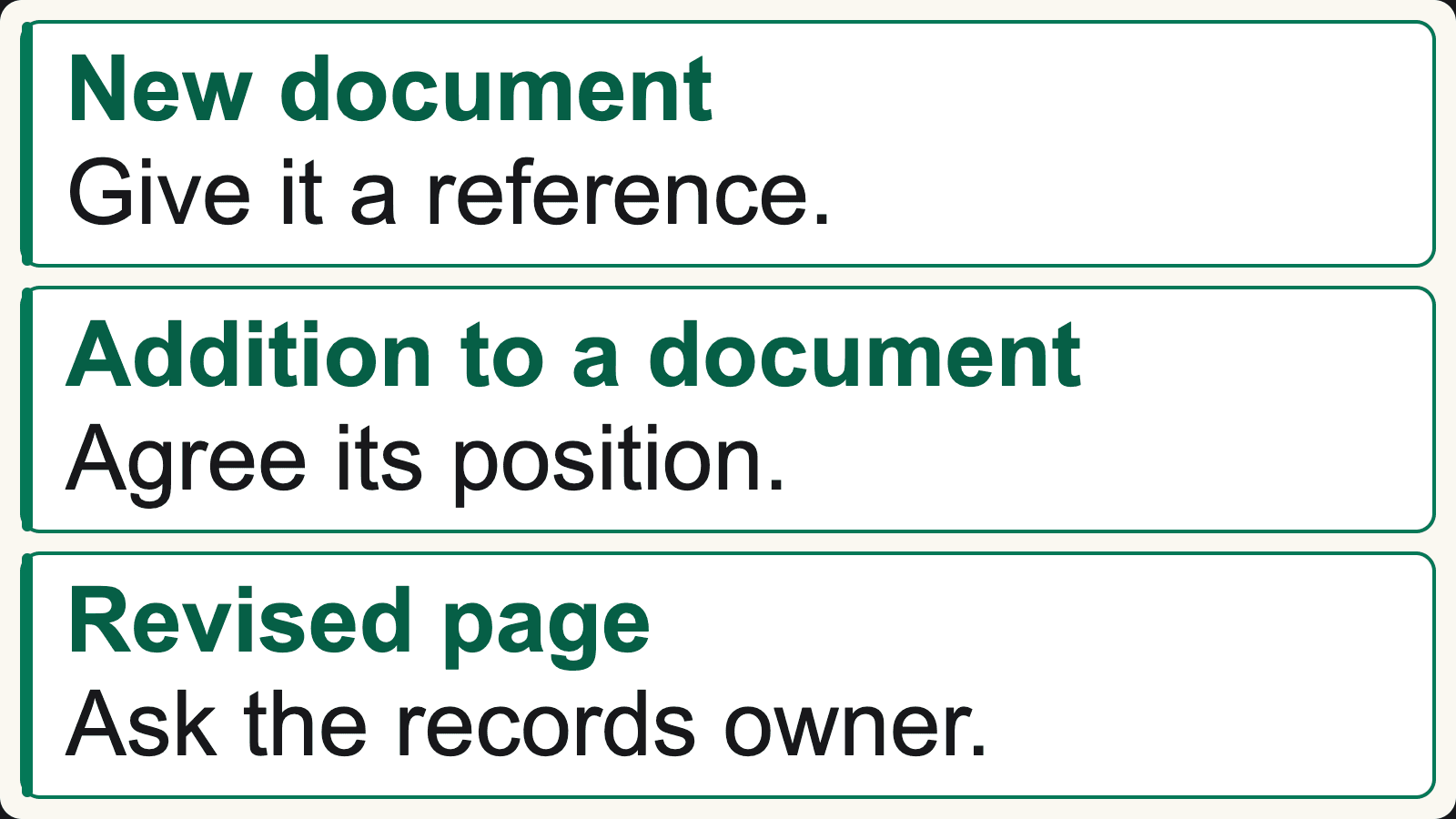
The diagram's three rows describe different decisions:
- New document: give it its own reference and link it to the relevant project or file. A new letter about the same project is not automatically an extra page of an earlier letter.
- Addition to an existing document: identify its parent document and agree where it belongs. An attachment or continuation needs a clear relationship, even if delivered as a separate digital file.
- Revised existing page: identify the earlier source and delivered version, then ask the records owner to decide how the change should be represented. Do not silently overwrite the earlier scan.
If the relationship is unclear, record the uncertainty for that owner. Similar titles, dates or filenames are insufficient instructions to merge or replace material.
These are also different PDF operations. Adobe documents inserting one PDF into another at a chosen position and separately documents replacing specified page ranges. Those product examples show why an update instruction needs to be precise; they do not identify Pexatech's software or decide which records belong together.
Keep a Small Additions Register
Record enough information to connect each arrival to a decision, without copying unnecessary document contents into the register. Useful fields are the arrival reference and date, parent file or document reference, relationship, intended batch, decision owner and current status.
The following example is entirely fictional. Its references, events and proposed actions are not customer records, completed work or promised service arrangements. A coordinator handed over folder PROJECT-41 in batch B01 on Friday. The following items arrive on Monday:
| Arrival | Relationship to B01 | Proposed next step |
|---|---|---|
| ARR-01: a new letter about PROJECT-41 | New document, received after handover | Allocate a document reference; list it for an agreed later batch |
| ARR-02: an attachment for document DOC-08 in PROJECT-41 | Addition to an existing document | Confirm the parent and attachment position with the records owner |
| ARR-03: a previously scanned sheet now carrying an annotation | Revised existing page | Identify the earlier page and delivery version; request an update decision |
| ARR-04: correspondence for PROJECT-52 | Belongs to a folder held back from B01 | Keep it associated with PROJECT-52; do not add it to PROJECT-41 |
All four entries remain pending until their next steps are agreed. They are not evidence that B01 missed four items. Conversely, a page shown in the handover inventory but absent from delivery needs investigation through the scanning quality checklist, rather than being relabelled as a later arrival.
Agree Who Produces the Updated Record
Choose whether later material will be supplied as separately linked files or incorporated into a revised PDF, and identify who performs that work. Confirm the review and delivery scope with the provider and destination owner. Supplying another scan does not automatically include merging, index maintenance or a system import.
Keep the stable record reference connected to the old and new locations. The naming and indexing guide explains that relationship. Record what changed and which delivery contains it so staff can distinguish an addition awaiting review from an approved update.
Some destinations can help track file versions. Microsoft's SharePoint versioning guidance explains that, when enabled, versioning can track changes and let users view or restore earlier versions. Ask the system owner to confirm the actual configuration. Version history does not establish whether all paper additions were captured or whether someone chose the correct parent document.
Tell Staff What Is Ready to Use
Before switching staff to an updated record, check the changed material and its immediate context: correct parent, page order, attachment relationship and file or index link. Where optional OCR was requested, check the added text separately from the visible images. Existing searchable pages do not demonstrate that newly inserted pages are searchable.
Communicate which reviewed version staff should use and where unresolved additions remain. “B01 delivered” and “PROJECT-41 current through Monday” describe different states. Make the second statement only when the later material has been accounted for and reviewed within the agreed scope.
For a document scanning enquiry, describe the active record groups, access constraints, proposed cutoff and who will manage subsequent arrivals. Ask which batch and update arrangements can be agreed. Keep a named owner for new material after the initial project ends; otherwise the next paper arrival restarts the same uncertainty.
Discuss scanning batches for active files
Describe the record groups, access needs and how new pages arrive. Confirm feasible batch, handling and update arrangements before sharing records.
Discuss Document Scanning