Scanning Documents with Sticky Notes: Keep the Context
A sticky note can carry an instruction, identify a passage or explain why a document was set aside. It can also cover the information someone needs from the page beneath it.
For a Sydney office handing over paper files, scanning documents with sticky notes therefore raises more than a question about whether the note appears in the PDF. The scope needs to distinguish the note’s content, its position and any covered information. Those three things may require different capture decisions.
Decide what the digital record needs to show
Consider each question separately:
| Capture question | What to agree before work starts |
|---|---|
| What does the note say? | Whether its wording needs to be readable in an image, and whether any separate text output is required. |
| Where was the note attached? | Whether the relationship to a particular page, paragraph or field needs to remain visible. |
| What is underneath it? | Whether the covered area needs capture, and what should happen if it cannot safely be accessed. |
Capturing the note alone may lose its relationship to the document. Capturing the page with the note attached preserves a view of that relationship, but leaves whatever it covers out of sight.
Neither image should be treated as a complete answer to all three questions.
Agree the handling boundary first
The US National Archives warns that sticky notes can become difficult to remove and may lift information from the underlying paper. Its preservation guidance says not to force removal and to record a note’s original location before moving it when that position is significant. This is archival care guidance, not an Australian legal rule or a handling method for your project. US National Archives: Paper
For the scanning scope, establish who can approve handling and what circumstances require work on that item to stop. Do not make removal a default instruction simply because text is covered.
Actual project feasibility, including any additional capture, review or output work, must be assessed and scoped. A scanning enquiry should not be taken as an offer of conservation treatment.
An example: two views connected to one source
The following example is entirely illustrative. The record reference, document and note wording are invented; the diagram is synthetic artwork, not an actual scan or a measurement.
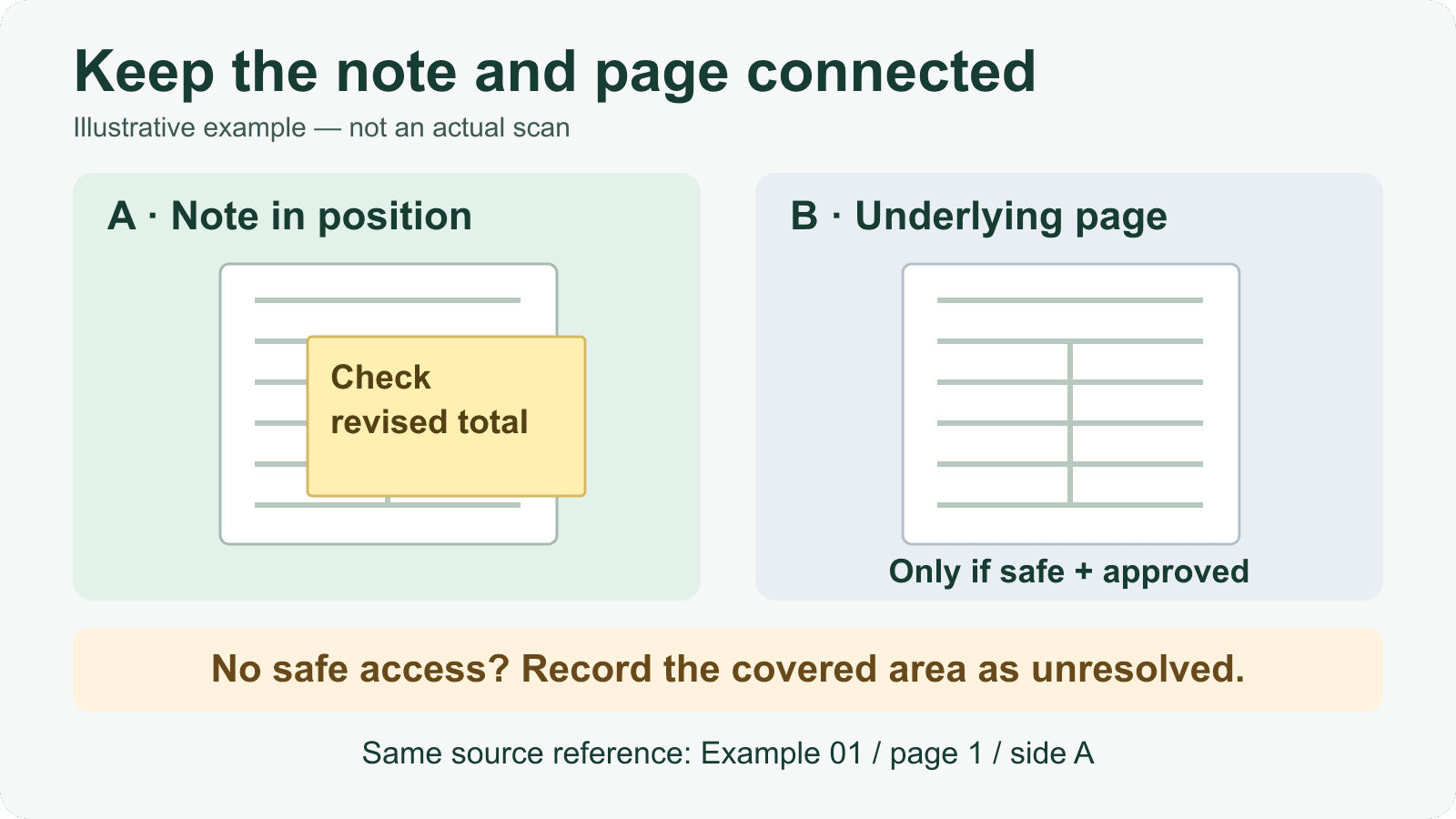
Suppose an office file contains a page with a sticky note reading “Check revised total” over part of a table. Its illustrative source reference is Example 01 / page 1 / side A.
View A — note in original position. The image shows the note and surrounding page together. It records the visible note wording and where the note sits relative to the table. The area behind the note remains covered.
View B — underlying page, only if handling is assessed safe and approved. If an agreed process permits access, an additional image can be planned to show the previously covered area. It must remain associated with the same source reference so a reviewer can understand that both views concern one page surface.
If the covered area is inaccessible — record it as unresolved. The record should identify the affected source reference and the remaining covered area. It should not contain guessed wording or imply that the hidden part was captured.
That is the full reading of the accompanying diagram: View A records the note in position; View B is conditional on safe, approved handling; both use the same source reference. Where access is unavailable, the outcome is an explicitly unresolved covered area.
The relationship between the views matters as much as their filenames. Agree how it will be represented in the delivery, such as through file naming, page labels or an accompanying index, subject to the project’s assessed scope.
Separate page counts from extra image views
Two images of the same page surface do not automatically mean two underlying paper sheets.
Before accepting a quote, distinguish:
- Physical sheets: the paper inventory, with an agreed approach to counting attached notes or other separate items.
- Scanned sides: which faces of the source material need capture.
- Additional image views: extra captures of a side to show the note, its position or an accessible underlying area.
Also agree whether linking those views, documenting exceptions and reviewing the output form part of the quoted work. The provider’s counting units and charging basis should be explicit; do not assume an additional view is included or charged as another physical page.
If a note’s colour conveys meaning, raise that during scope assessment too.
Keep OCR as a separate decision
OCR is optional text recognition applied to an image. It cannot recover underlying text that an opaque note has hidden from that image. A searchable PDF does not resolve an uncaptured area.
Handwritten note recognition also needs separate assessment. Readable handwriting in an image and usable recognised text are different output questions. Agree whether the requirement is an image of the note, searchable text, a separately reviewed transcription or another defined output. See the guide to OCR for handwritten documents for that distinction.
Start with a scope discussion
Before sharing confidential samples, describe the files, the extent of sticky-note coverage and which of the three capture questions matter to your team.
Use the document scanning service enquiry to discuss assessment and scope. The useful starting point is a clear requirement: preserve the note’s context, identify what remains covered and establish what additional work is feasible before agreeing the quote.
Discuss notes and covered information
Describe your files, the extent of sticky-note coverage and the information your team needs. Confirm suitability, handling and any additional capture or review scope before sharing confidential samples.
Discuss Document Scanning